

Connect Claude and ChatGPT to IZY Social
Updated: October 13, 2026 · 2 min read
You can connect IZY Social to the AI you already use. Once connected, you ask Claude or ChatGPT to draft and schedule posts, check your analytics and answer comments. The connection is free on every plan. Find the connection URL under Settings → AI connections: https://www.izysocial.com/mcp
Claude (claude.ai and the desktop app)
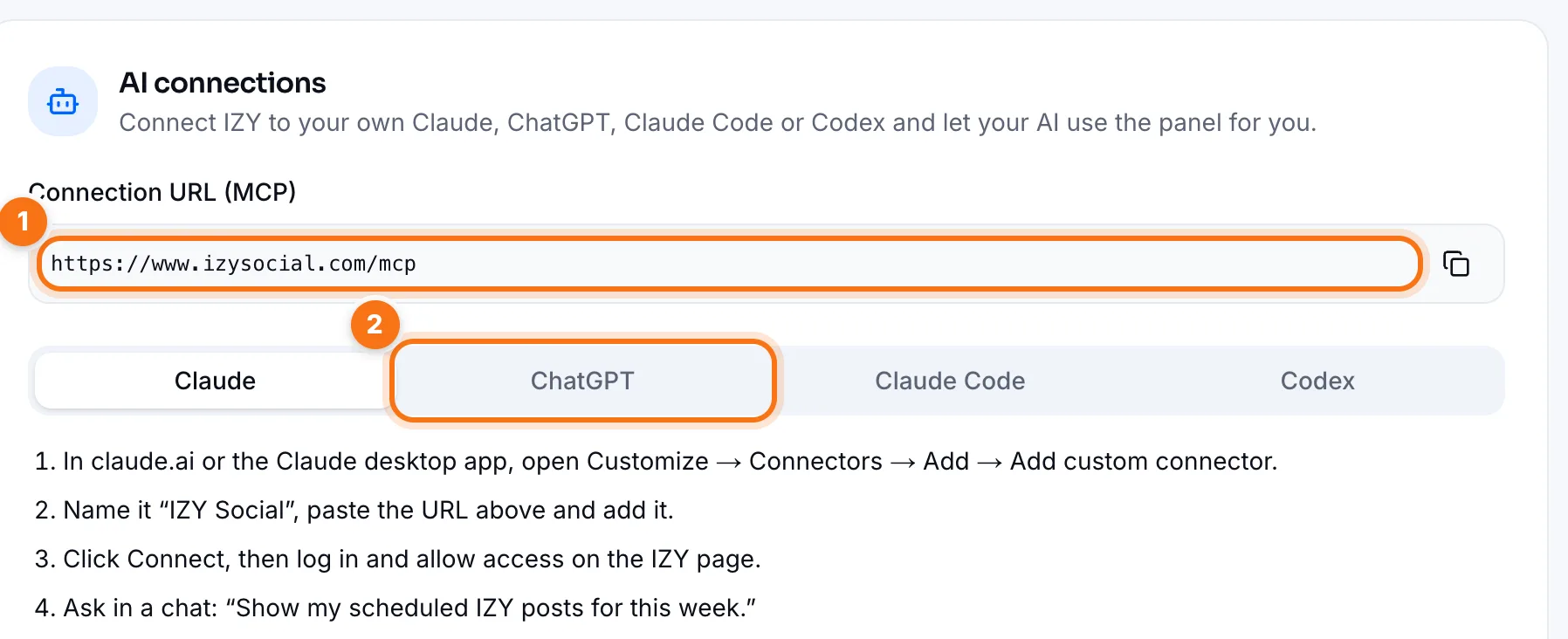
- 1In claude.ai or the Claude desktop app, open Customize → Connectors → Add → Add custom connector.
- 2Name it IZY Social, paste the connection URL and add it.
- 3Click Connect, then log in on the IZY page and click Allow.
- 4Try it in a chat: "Show my scheduled IZY posts for this week."
ChatGPT
- 1In ChatGPT, open Plugins → Add → Add custom MCP server. If the option is missing, turn on Developer mode in Settings first.
- 2Set the name to IZY Social, the URL to the connection URL and authentication to OAuth. Tick the checkbox and create it.
- 3Click Continue with IZY Social, then log in on the IZY page and allow access.
- 4Try it in a chat: "Use IZY Social to show this week's posts."
Claude Code and Codex (for developers)
For Claude Code, run claude mcp add --transport http --scope user izy https://www.izysocial.com/mcp in your terminal. Then type /mcp in Claude Code, pick IZY Social and allow access on the page that opens.
For Codex, run codex mcp add izy --url https://www.izysocial.com/mcp and allow access on the IZY page. If the page doesn't open, run codex mcp login izy.
What you can do
- Have it write posts in your brand voice and schedule them.
- List scheduled posts, move them or publish one right away.
- Ask about your accounts' analytics and create reports.
- Read and answer comments and messages in your inbox.
The AI can do anything you can do in the panel, on your behalf. Asking it to show the draft before publishing is a good habit.
Removing the connection
Connected apps are listed under Settings → AI connections. Click Remove and that app loses access to IZY right away.
Frequently asked questions
Does the connection cost extra?
No, it's free on every plan. Your own Claude or ChatGPT subscription applies on their side.
Do I give my password to the AI?
No. You log in on IZY's own page; the AI only gets the access key you approve.
Which Claude and ChatGPT plans support it?
Custom connectors and custom MCP servers depend on the app's plan and settings. If you don't see the option, check the app's settings and your plan.