

Inbox: Reply to Every Comment and Message in One Place
Updated: October 11, 2026 · 2 min read
The Inbox collects comments and messages from every connected platform in one list. You reply to all of them here without opening each app.
Replying
Each conversation shows its platform icon and type (Comment or Message). A blue dot means unread.
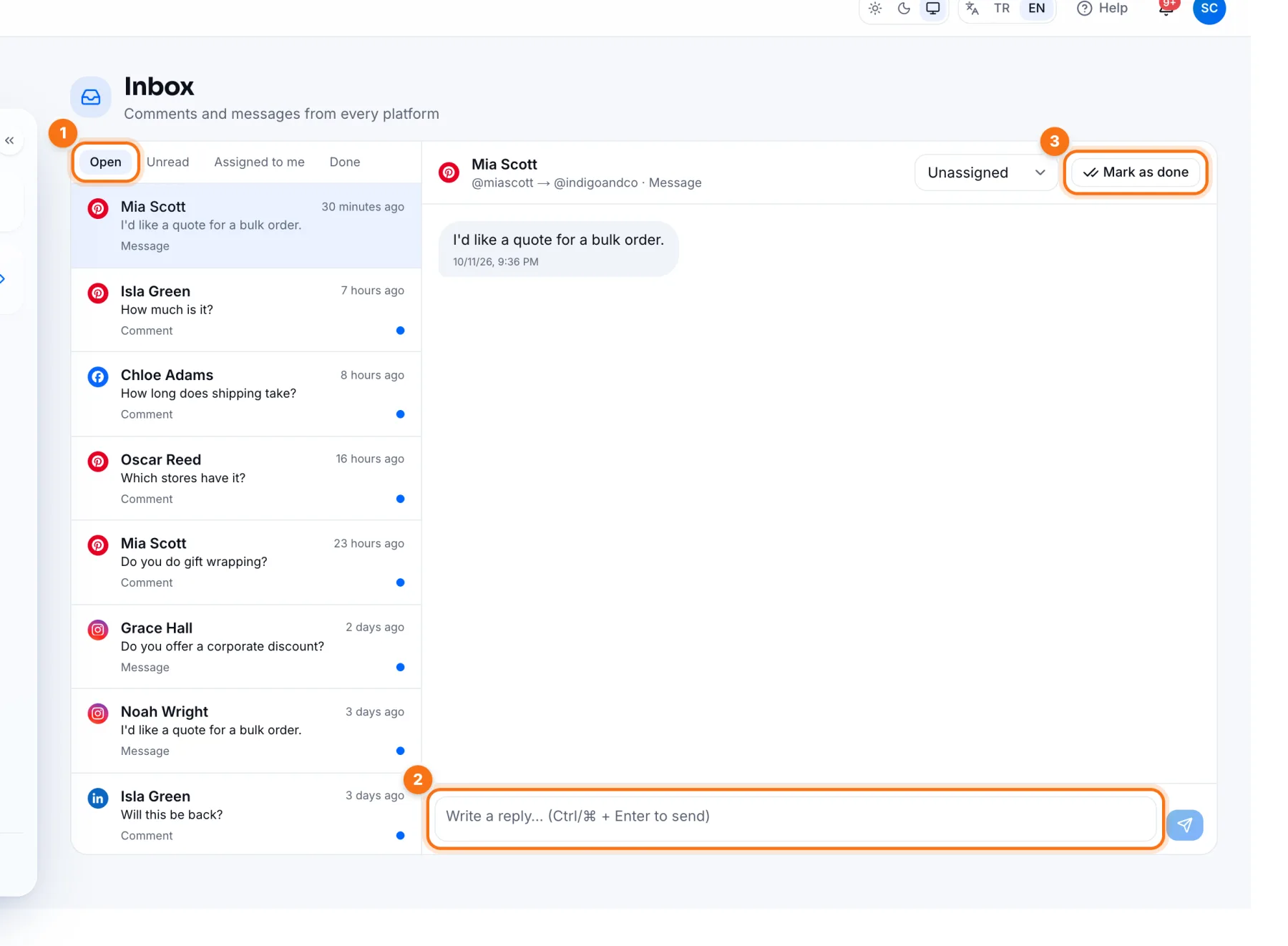
- 1Filters: Open, Unread, Assigned to me and Done. Click a conversation on the left to open it on the right.
- 2Reply box: type your answer and press send, or Ctrl/⌘ + Enter. The reply goes out on the platform the message came from.
- 3Mark as done: close the conversation when it's handled; it moves to Done. You can reopen it if needed.
A good routine
- Check Unread twice a day, say morning and evening.
- Answer questions first; quick replies help both the customer and your reach.
- Mark each handled conversation Done so Open only shows what's waiting.
Frequently asked questions
Which platforms' messages come in?
Comments and messages that each platform allows apps to access, for the accounts you've connected. Some platforms don't share DMs; then only comments appear.